Is Your Gmail Account Really Hacked? Or Just a New Scam Trick
Overview
Recently, scammers have been exploiting users’ trust in security alerts from tech companies like Google. They impersonate support teams and use sophisticated tactics to steal login information and take over personal accounts.
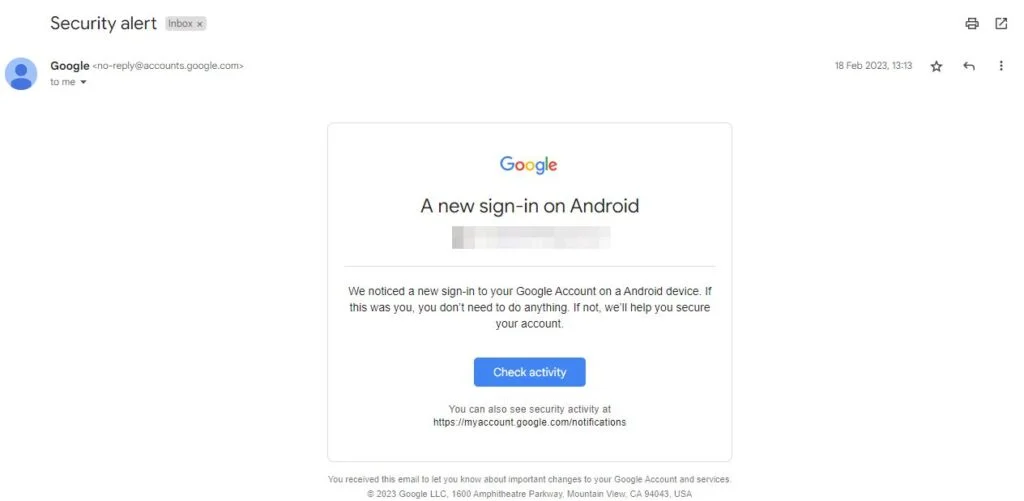
The most common tactic involves sending a fake email or making a phone call, claiming that your Gmail account is under attack. The perpetrator asks you to reset your password and often sends a separate reset email. When you enter your login information and read the verification code, they use that time to take over the account.
How Attackers Execute
Initially, attackers create a fake email with a display name similar to “Google Security” or “Gmail Alert.” The email content mentions that your password is under attack and needs to be reset immediately.
Example: [email protected]
Due to the email design being very realistic, users believe their account has actually been compromised. Sometimes, in certain cases, the email content even asks them to call a fake support number.

When users click on the link in the email or simply select “Reset Password Now,” they are redirected to a fake login page. Here, the fake website is created with a URL that looks real, such as: ”accounts.google.secure-reset.com”, with an interface copied from Google’s login page. Users will enter:
- Account name (email)
- Current password
As soon as the attacker obtains the victim’s password, they immediately log in and use the stolen information to:
- Actually log into Gmail.
- Trigger the two-factor authentication (2FA) step.
While the user is waiting for the 2FA verification email or message, the scammer calls pretending to be a “Google support employee” to get the OTP sent to the victim’s phone.
Finally, they use the OTP to complete their attack by:
- Successfully logging in.
- Changing the password.
- Unlinking devices, changing the recovery email, or phone number.
Conclusion
The fake Gmail security alert campaign shows the increasing sophistication of phishing attacks today. By exploiting fear, using fake emails, visually deceptive login pages, and even fake calls pretending to be Google employees, many users have fallen for the trap—even those who thought they were cautious.
The most important factor is not the technology, but the awareness and security habits of each individual. In an increasingly complex digital environment, a single unchecked click can cost you all your data, identity, and privacy.
IOC
- Malicious Domain
- google-verify-login[.]net
- accounts.google.verify-now[.]com
- googIe-login[.]com
- secure-gmail-authentication[.]site
- mail-gogle[.]com
- gmail-alert.com-security[.]org
- gooqle[.]com
- security.google.reset-password[.]top
- accounts-login-gmail[.]cloud
Recommendation
- Carefully check the sender’s email address
- Don’t just look at the display name (e.g., “Google Security”).
- Carefully check the actual email address behind the name (many cases use
@outlook.com,@mail-support.org, etc.). - Genuine Gmail always sends from addresses ending in
@google.comor@accounts.google.com.
- Do not click on suspicious links in emails
- Hover over links to preview the URL – if it’s not
https://accounts.google.com, absolutely do not click. - Do not log into your Google account through strange links.
- Hover over links to preview the URL – if it’s not
- Do not share OTP/verification codes with anyone
- Google NEVER calls or texts to ask for your verification code.
- Never read authentication codes (OTP) over the phone, email, or message.
- Enable two-step verification (2FA) using a security app
- Use Google Authenticator, Microsoft Authenticator, or other authentication apps instead of just SMS.
- This reduces the risk of being hacked if someone gets your password.
- Always log in through official addresses
- Access Gmail through:
https://mail.google.com
https://accounts.google.com - Avoid logging in through links sent by third parties.
- Access Gmail through:
- Be wary of content with high urgency
- Phishing emails often have subjects like:
- “Unusual sign-in attempt”
- “Your account will be disabled in 24h!”
- This is a tactic to scare you into acting quickly.
- Phishing emails often have subjects like:
Reference
How to spot the latest fake Gmail security alerts | Malwarebytes
| Exclusive article by FPT IS Technology Experts
Luu Tuan Anh – FPT IS Cyber Security Center |