RCE in Chrome: A hacker just needs you to open a webpage!
Recently, a dangerous vulnerability was discovered in Google Chrome’s JavaScript V8 that allows attackers to execute arbitrary remote code on target systems. This vulnerability originates from a flaw in the type canonicalization of WebAssembly (Wasm), specifically in the function CanonicalEquality::EqualValueType()—which involves comparing and “normalizing” Wasm data types.
Main Impact
- Remote code execution
- Bypass browser sandbox
- Automation and mass exploitation
- Affect users and businesses
Exploit Details
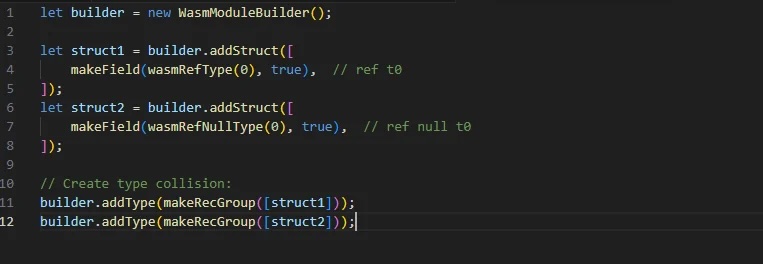
As mentioned, this vulnerability exists due to a logic error in type checking between ref t and ref null t. Additionally, the lack of accurate hash checking when canonicalizing recursive types in Wasm also contributes to this vulnerability, allowing attackers to successfully perform RCE on your system. This issue also raises the risk of two previously exploited zero-day vulnerabilities: CVE-2024-12381 and CVE-2024-12692.

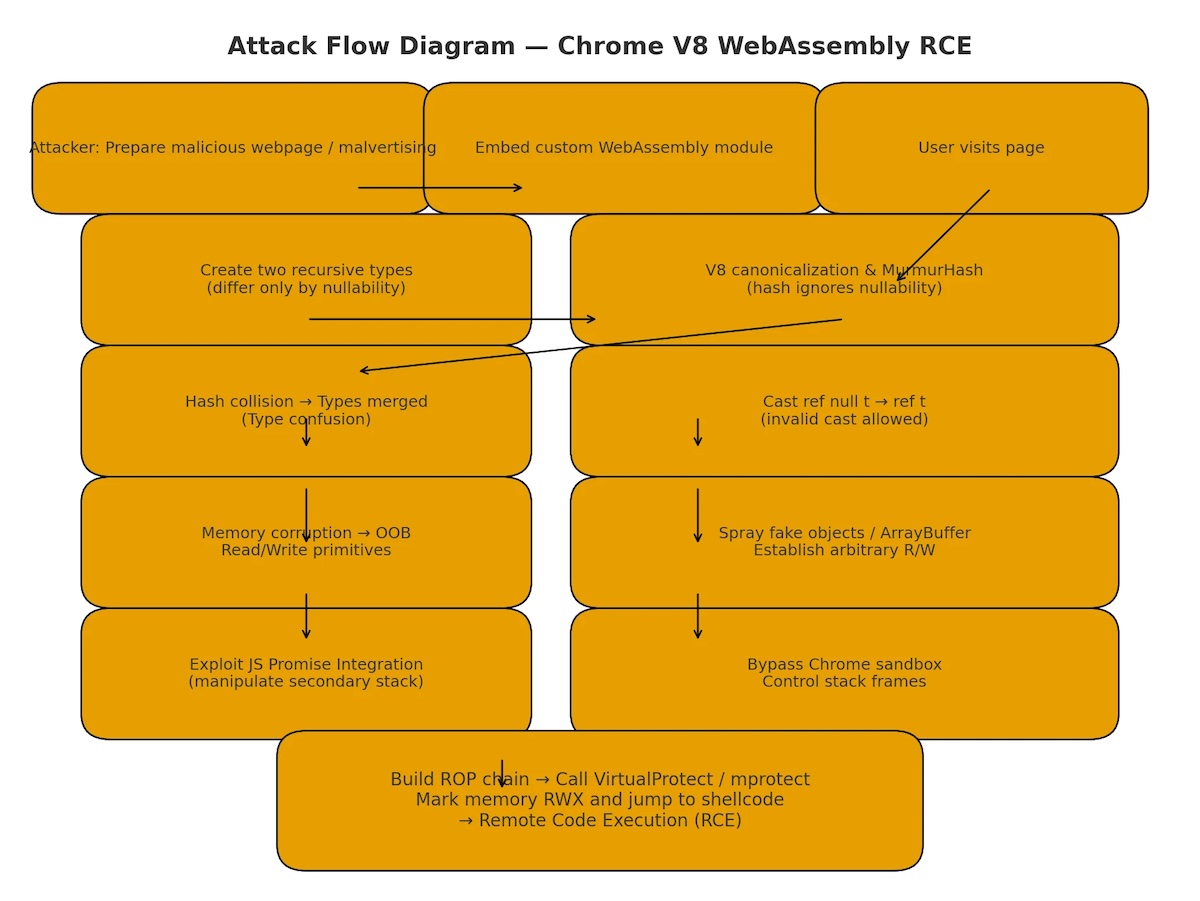
First, the attacker will create a memory area that can be read and written out of bounds (OOB). Specifically, in WebAssembly’s CanonicalEqualityEqualValueType, there is an incorrect distinction between ref t and ref null t in the recursive type group. If the attacker provides recursive type structures that are similar but differ only in nullability, the system will hash them to the same value (since MurmurHash does not account for nullability).
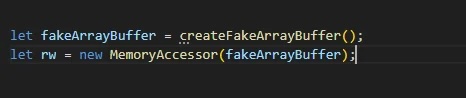
Moving on to the stage of creating OOB and gaining control. The attacker’s goal is to exploit type confusion to turn an object ref null t into ref t, which will cause access errors and thereby grant free read or write access on ArrayBuffer.
In detail with this campaign, the attacker will create a fake object in memory and force WebAssembly to execute a function with the wrong type object without crashing.
The next and most important step is to perform “Bypass Sandbox (escape V8 sandbox).” The attacker will exploit the JSPI (JavaScript Promise Integration) mechanism and use the Promise stack to switch frames, creating “empty” (suspended) frames to escape the V8 sandbox and execute native code. Naturally, after successfully bypassing, VirtualProtect will be called to execute the shellcode.
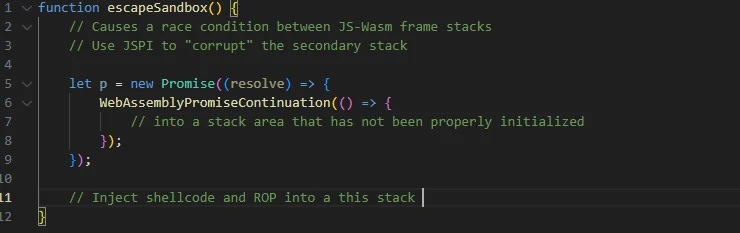
Finally, of course, is executing the shellcode. The attacker will call VirtualProtect to set the RWX (read-write-execute) permissions. Then they will copy the executable code or payload into that memory area and run a calc.exe process to execute arbitrary code on the target system.
Conclusion
The RCE vulnerability bypassing the sandbox in Google Chrome through CanonicalEquality::EqualValueType() clearly demonstrates how complex logic errors in type handling (type canonicalization) can lead to remote code execution at the system level, especially when combined with sophisticated sandbox bypass techniques like JSPI stack switching.
Users and organizations need to have a quick response strategy, especially in environments using WebAssembly or sandboxes. This vulnerability is not just a technical issue but also a warning about how small details in system logic can be exploited to break through the biggest security barriers.
Recommendations
- Update Google Chrome immediately
- Check and ensure the browser is on the latest version (at least above M137 with the official patch if available).
- Visit:
chrome://settings/helpto manually check and update.
- Do not use Chrome with the
--no-sandboxoption- Some users (especially devs or in Docker environments) launch Chrome with the
--no-sandboxflag to avoid errors. This is extremely dangerous when there is an RCE vulnerability. - Remove this flag from all configurations (e.g., CI/CD scripts, Dockerfile, shortcuts…).
- Some users (especially devs or in Docker environments) launch Chrome with the
- Disable JavaScript or WebAssembly when not necessary
- If browsing in high-risk environments (bug bounty, darknet, etc.), consider using extensions:
- NoScript or uBlock Origin to block untrusted scripts/WebAssembly.
- You can configure to block Wasm via
chrome://flags:- Search for
"WebAssembly"and manually disable items like"WebAssembly Garbage Collection"if needed.
- Search for
- If browsing in high-risk environments (bug bounty, darknet, etc.), consider using extensions:
- Configure systems to monitor suspicious behavior
- Monitor unusual activities such as:
- Accessing unreasonable memory addresses from Chrome.
- Unusual resource spikes when loading pages.
- Unusual WebAssembly data in traffic (via proxy/business IDS).
- Do not open strange links, especially HTML links sent via email/chat.
- Monitor unusual activities such as:
Reference
| Exclusive article by FPT IS Technology Experts
Luu Tuan Anh – FPT IS Cyber Security Center |