What is Claude Code? 3 impacts of Claude Code on the software development industry
The rapid advancement of Large Language Models (LLMs) is ushering in a new generation of programming tools, where AI not only suggests code but can actively participate in the software development lifecycle. A notable recent example is Claude Code – Anthropic’s AI-powered coding tool, which has demonstrated the ability to read and understand COBOL systems, a foundational technology underpinning many legacy financial platforms. This development is believed to have contributed to a 13% drop in IBM’s stock price in a single trading session, reflecting the potential disruptive impact of AI on traditional technology sectors, particularly those focused on COBOL system modernization.
In this context, Claude Code is emerging as a representative example of “agentic coding,” where AI moves beyond code generation to operate as an autonomous agent – capable of reading entire codebases, planning tasks, modifying multiple files, executing tests, and validating outcomes. This article analyzes Claude Code from both system and technology perspective. It begins with an overview of the product, its core capabilities, and practical usage in real-world development environments. The core section explores the technical architecture of Claude Code, including the agent loop, toolchain for codebase interaction, runtime, context and project memory management, and governance layers such as access control, sandboxing, and the Model Context Protocol (MCP). Through this lens, Claude Code is positioned not merely as a code-generation model, but as a fully integrated agentic system combining models, tools, and orchestration, offering a glimpse into the transformative impact of agentic coding on the software industry.
1. Overview of Claude Code
Claude Code is an AI-powered programming tool developed by Anthropic, designed to assist developers in executing software development tasks directly within their working environments, such as the terminal or integrated development environments (IDEs). The product was first introduced in February 2025 in an experimental release. By May 2025, it was made generally available alongside the Claude 4 model family, including Opus 4 and Sonnet 4. The platform has since expanded across multiple interfaces, including a web version on claude.ai/code (October 2025), a desktop application (November 2025), and advanced capabilities such as automated code review introduced in early 2026.
Claude Code is categorized as an agentic coding tool – an AI-driven system capable of autonomously executing complex technical workflows rather than providing step-by-step assistance. Developers can assign high-level objectives, such as implementing a new feature, fixing a build issue, or refactoring a module, and the system will independently analyze the codebase, generate an execution plan, and carry out the required changes. Internally, Anthropic utilizes Claude Code extensively, describing it as an agent-based environment capable of orchestrating multiple actions and tools across the software development lifecycle.
From a technical standpoint, Claude Code functions as a coding-oriented AI agent powered by large language models. Unlike traditional autocomplete tools, which predict the next line of code based on a limited context window, Claude Code operates at the full-project level. Upon receiving a task, it can read multiple files within a repository, analyze directory structures, and understand build and test configurations to form a comprehensive system-level understanding before making modifications.
Beyond code comprehension, Claude Code can directly interact with the development environment through integrated tools such as file systems, shell commands, Git, and MCP servers. This enables the AI not only to generate code suggestions but also to execute real development tasks, such as editing files, running tests, building projects, debugging errors, and creating commits or pull requests. These activities are executed within an iterative loop consisting of planning, execution, and monitoring, under developer supervision.
This approach differentiates Claude Code from traditional coding chatbots. Rather than simply answering coding-related queries, it actively participates in the software development process, functioning as a “virtual developer” capable of handling technical tasks within a real-world project environment.
1.1. What can Claude Code do?
Claude Code is designed as an agentic coding platform capable of engaging across multiple stages of the software development lifecycle. Its core capabilities include:
Codebase exploration and understanding
Claude Code can rapidly ingest and analyze an entire repository to understand system architecture. By searching and opening relevant files, it can summarize project structure, describe key modules, explain data flows, and identify relationships between components such as APIs, services, and databases. This capability is particularly valuable for onboarding new developers, evaluating third-party codebases, or accelerating project handovers.
Feature development
Claude Code can build complete features from natural language descriptions. The agent interprets requirements, formulates an implementation plan, identifies the files to be created or modified, and executes coordinated updates across multiple components. Notably, it can generate code that adheres to the project’s existing coding standards, frameworks, and conventions.
Debugging and issue resolution
A key strength of Claude Code is its ability to support debugging workflows. Given error logs or stack traces, it can trace related code paths, identify root causes, and propose fixes. After applying changes, it can re-run builds or test suites to verify resolution, significantly reducing troubleshooting time in complex systems.
Refactoring and code optimization
Claude Code supports large-scale refactoring tasks, such as renaming functions across an entire codebase, modularizing components, standardizing data types, or modernizing legacy systems. Its ability to process and update multiple files simultaneously ensures consistency and reduces the risk of missed dependencies or broken references.
Test generation and technical documentation
Claude Code enables test-driven development by automatically generating unit tests, integration tests, and end-to-end tests for new or untested code segments. It can also produce technical documentation, including API specifications, deployment guides, changelogs, and pull request summaries.
DevOps workflow automation
Through shell execution and Git integration, Claude Code can participate in various stages of the software delivery pipeline. It can run test suites, linters, and builds, troubleshoot CI/CD failures based on logs, create commits with descriptive messages, open pull requests, and generate release notes. With integrations such as MCP, it can also connect to external systems like Jira, Slack, or internal knowledge bases to support end-to-end development workflows.
1.2. Getting started with Claude Code
Claude Code is designed to integrate seamlessly into developers’ existing workflows, particularly within terminal environments and real-world code repositories. Initial setup is straightforward and typically requires only a few minutes. Users must have an active Anthropic account (Pro or higher) or an API key for authentication.
New users can refer to the official Claude Code documentation or explore the free course Claude Code for Everyone at: https://ccforeveryone.com
1.2.1 Installing Claude Code
Claude Code supports macOS, Linux, and Windows (via native execution or WSL2). The recommended installation methods include native installers or widely used package managers.
Example installation methods:
macOS / Linux:
curl -fsSL https://claude.ai/install.sh | bash
Windows PowerShell:
irm https://claude.ai/install.ps1 | iex
These commands automatically download the Claude Code CLI (Command Line Interface) and configure the required environment. After installation, you can verify the setup by running:
claude
1.2.2. Starting the work session
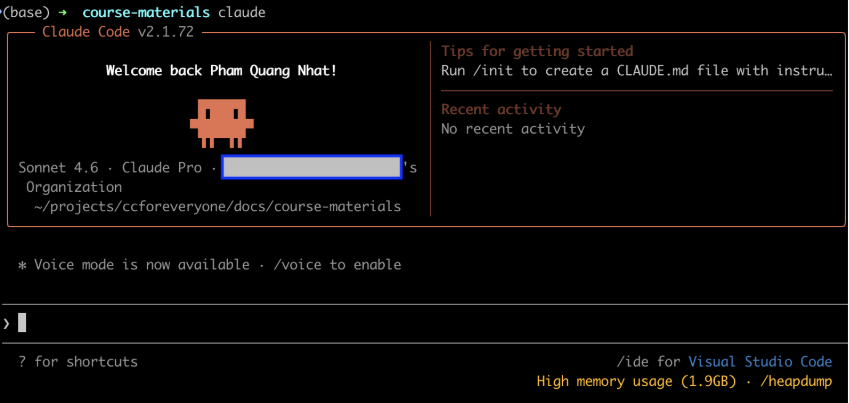 Figure 1: Command-line interface (CLI) of Claude Code
After installation, the usage process is very intuitive:
- Move to the project folder:cd my-project
- Start Claude Code:
claude - Log in to your Anthropic account
Use the /login command in the Claude Code session. Claude Code will automatically open a browser to log in via OAuth. After successful authentication, the CLI returns to the terminal session.
Use the /login command in the Claude Code session. Claude Code will automatically open a browser to log in via OAuth. After successful authentication, the CLI returns to the terminal session.
1.2.3. Interacting using natural language
From this point on, you can assign tasks to Claude using natural language, for example:
- “Explain the architecture of this project”
- “Write tests for the authentication module”
- “Refactor this API endpoint and run tests”
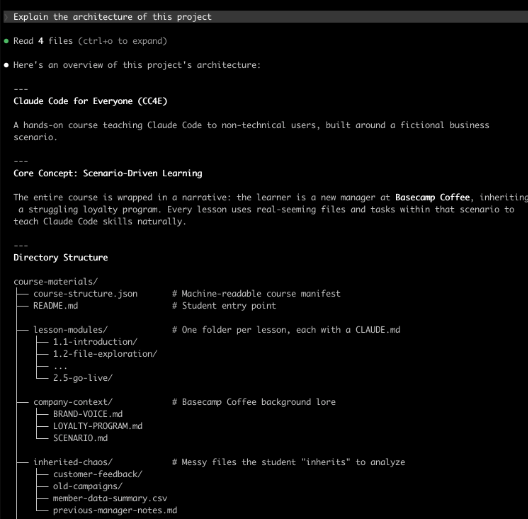 Figure 2: Claude Code understands and interprets the contents of the codebase.
2. Understanding the technology and architecture behind Claude Code
Claude Code is not merely an AI model capable of writing code, it is a full system built around a large language model, incorporating components such as tools, execution environments (runtime), memory and context management, permission systems, and extensibility mechanisms. Understanding the architecture behind Claude Code and its internal components helps users apply the tool more effectively and avoid unrealistic expectations, either overestimating its capabilities or becoming frustrated when it behaves in unexpected ways.
2.1. How does Claude Code work?
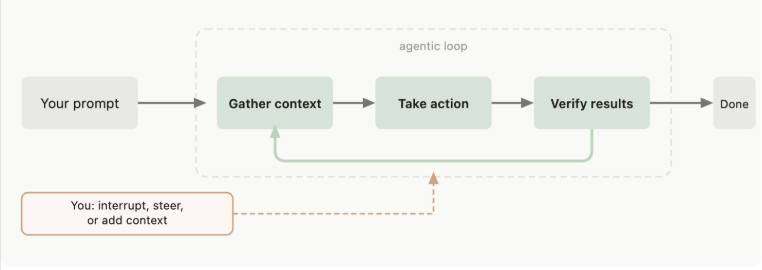 Figure 3. Claude Code’s Agentic loop
Claude Code operates through a loop known as the agentic loop (Figure 3). This loop is driven by two core components: reasoning-capable models and action-executing tools. This represents a fundamental difference from traditional autocomplete systems, which simply predict the “next line of code” based on local context.
When it receives a task, it processes it through three main stages:
(1) gathering context: searching for files, reading code, understanding the codebase structure
(2) taking action such as modifying files, running commands, creating new files
(3) verifying results: running tests, checking output, validating changes.
These stages are not strictly sequential but often interleaved. Throughout the process, Claude Code continuously uses supporting tools, such as: searching files to understand the system, modifying code to implement changes, or running test suites to validate results. For simple codebase-related questions, Claude Code may only need to gather context. For more complex tasks like debugging, it may iterate through multiple cycles: locating relevant files, modifying code, running tests, analyzing errors, refining the solution, and verifying again. The system can chain dozens of actions and dynamically adjust its strategy based on intermediate results. The loop continues as long as the model’s responses include tool calls. When the LLM produces plain text without invoking any tools, the loop naturally terminates, returning control to the user.
Importantly, the user is also part of this loop. You can interrupt the process at any time to redirect Claude, provide additional context, or request an alternative approach. While Claude Code operates proactively, it remains responsive and adaptable to user instructions.
2.2. Claude Code architecture
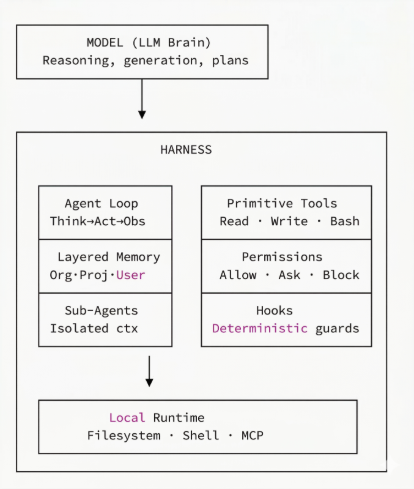 Figure 4. Architecture of Claude Code – a system operating around the Claude model.
Figure 4 illustrates the architecture of Claude Code. It functions as an agentic harness around Claude language models, providing tools, context management mechanisms, and execution environments. This transforms a language model into a fully capable coding agent. The following sections examine these architectural components in more detail.
2.2.1. Model – The brain of Agentic Coding
The language model acts as the “brain” of the agentic coding architecture. Claude Code leverages large language models such as Claude Sonnet and Claude Opus to understand code, plan tasks, and decide when to use tools versus when to respond directly based on existing knowledge.
The model itself does not execute tools. Instead, it determines which tools to use and what parameters to provide based on the current context. A helpful analogy is a remote advisor: you describe a problem and your available capabilities, and the advisor provides step-by-step instructions, including which tools to use. You execute those instructions and report back results, enabling the advisor to refine its guidance. This process continues until a complete solution is reached.
Claude Code uses models optimized for programming and tool calling. These models are trained and/or fine-tuned on large-scale multilingual codebases and tool-usage data, improving syntax accuracy, long-context retention, and tool-calling precision.
The system supports multiple LLMs. Sonnet performs well on most standard programming tasks, while Opus offers stronger reasoning capabilities for complex architectural decisions.
2.2.2. Tools – Enabling action execution
While LLMs can only generate text, tools provide Claude Code with the ability to take action, making it truly agentic. With tools, Claude Code can read and modify code, execute commands, perform web searches, and interact with external services. Each tool execution feeds results back into the agentic loop, allowing the LLM to determine the next step.
2.2.3. Memory and context management
Claude Code’s context window includes conversation history, file contents, command outputs, CLAUDE.md files, loaded skills, and system instructions. Over time, this context can grow and approach the maximum token limit supported by the model.
To address this, Claude Code includes an automatic context compaction mechanism. When context usage reaches approximately 75 – 92%, a compactor module activates, summarizing conversation history, removing verbose tool outputs, and retaining critical information such as file paths, function names, error messages, and decisions. This typically reduces token usage by 60 – 80%.
Key mechanisms for memory and context management include:
- CLAUDE.md file: A persistent instruction file where users define project-level guidance such as coding standards, workflows, architecture, and build/test conventions.
- Auto memory: Claude Code can automatically record learnings and patterns based on user corrections and preferences. While each session starts with a fresh context window, CLAUDE.md and auto memory allow knowledge to persist across sessions.
- Subagents: Subagents operate in isolated contexts separate from the main conversation. They do not increase the primary context size and return only summarized results upon completion. This makes them particularly useful for long-running or complex tasks.
2.2.4. Hooks: Places to attach automation and guardrails for a business.
Claude Code Hooks allow developers to define shell commands that automatically trigger at specific points in the system’s lifecycle. Unlike probabilistic LLM behavior, hooks provide deterministic control, ensuring certain actions always occur. There are four main lifecycle events: PreToolUse, PostToolUse, Notification, and Stop. Common use cases include: automatically running linters or syntax checks after file edits; executing test suites; sending desktop notifications; performing security checks before commits. Hooks enable Claude Code to function as a professional development partner deeply integrated into real-world workflows.
2.2.5. Model context protocol – Connecting tools and data
Model Context Protocol (MCP) is an open standard introduced by Anthropic in November 2024 to standardize how AI systems integrate with external data sources and tools. MCP solves the “N×M problem”, where each AI application previously needed to write its own connector for each data source. MCP uses the JSON-RPC 2.0 protocol with a three-tier architecture: Host (the LLM application initiating the connection, for example, Claude Code), Client (the connector managing communication within the host), and Server (the service providing external tools, databases, and APIs).
MCP defines three core components: Tools (functions that the AI decides to call), Resources (data that the application decides to display), and Prompts (templates that the user actively activates).
2.2.6. Permissions and safety mechanisms
Claude Code employs a multi-tiered permission system with three types of rules prioritized for evaluation: Deny (completely blocks, always highest priority) → Ask (requires confirmation) → Allow (automatically allows). Five operating modes are included: Default (asks when editing files and running commands), AcceptEdits (automatically accepts file edits, asks when running commands), Plan Mode (read-only, discovery mode), DontAsk (does not ask, allows automation), and BypassPermissions (disables all checks – only used in isolated environments).
At the operating system level, Claude Code uses sandbox: Seatbelt on macOS, bubblewrap + socat on Linux/WSL2, providing kernel-level protection even if hackers use prompt injection to bypass the model’s decision layer. Each file change creates a checkpoint that can be rolled back, and users can integrate Git to provide an additional layer of security.
2.2.7. Runtime environment
The runtime environment in Claude Code is where Claude Code operates and interacts directly with the user’s system, specifically the terminal and codebase. For security, Anthropic has built a sandbox runtime to isolate the bash tool, allowing Claude to run commands within predefined limits. The sandbox applies two layers of control: filesystem isolation (read/write only in the current working directory) and network isolation (connection only through a controlled proxy). This architecture is built on OS-level platforms such as Linux bubblewrap and macOS seatbelt.
In addition to the local environment, the web version of Claude Code allows individual sessions to run in a separate cloud sandbox, with configurable network access and the use of scripts to install dependencies. This foundation makes Claude Code both robust and secure in enterprise environments.
3. The software industry in the era of agentic coding
The emergence of tools like Claude Code, Github Copilot, Cursor, Codex, and Antigravity is creating a profound shift in how software is built. While AI coding tools previously focused primarily on autocomplete or code suggestions, agentic coding elevates AI to a new role: an agent capable of planning, writing code, running tests, and debugging within a relatively autonomous loop. This necessitates adjustments to the entire software development process.
3.1. From writing code to writing specifications and testing
A major shift is the changing role of developers. As agents increasingly handle code generation, developer value shifts toward:
- Defining goals and task scope
- Clearly specifying requirements
- Establishing correctness criteria (tests, expected outputs, acceptance conditions)
- Evaluating and validating results
Documentation and specifications must also evolve, not just for human readability but for machine interpretability, enabling coding agents to parse and act on them effectively.
Developers will spend more time on building, testing, reviewing, and refining outputs, tasks that require human judgment to ensure system quality.
3.2. Democratizing software development
One interesting impact of agentic coding is that it expands software development capabilities beyond traditional engineering teams. As agents can read files, run commands, query APIs, and generate automated scripts, many non-engineering teams begin creating their own tools. For example, a marketing team can create workflows to process CSV data and generate various ad variations automatically, a product design team can deploy prototypes from mockups.
3.3. Increased productivity, increased risk
Alongside the productivity benefits are new risks. Recent reports and studies show that a significant portion of the source code generated by model-generated code may contain security vulnerabilities and quality issues, requiring careful review and testing before use in a production environment. Some empirical studies also indicate that the density of code smells in model-generated code is higher than in reference source code, and large-scale analyses such as the GitClear report observe increased code duplication and modification frequency during the period when AI-powered programming tools are widely used.
Furthermore, automated systems capable of calling tools and executing commands introduce new risks such as prompt injection attacks from code repositories or external services, the system performing malicious actions if permissions are not restricted, and data leaks when access and aggregation of sensitive information are possible. Therefore, many guides and tools supporting automated programming are designed using a “permission-first” model: separating read and execute permissions, setting read-only mode as the default, requiring approval or inclusion in an authorized list before executing impactful commands, and executing within an isolated area to narrow the scope of impact if the system is exploited.
4. Conclusion
Claude Code represents a significant step forward in the transition from coding assistants to fully autonomous coding agents. Rather than generating isolated code snippets, it integrates language models, tool systems, context management, and execution environments into a cohesive agentic system capable of reading codebases, planning tasks, modifying code, and validating outcomes within an automated loop. This approach transforms AI from a “code suggestion tool” into a technical collaborator actively participating in the software development lifecycle. Architectural elements such as the agentic loop, tool systems, memory management, and Model Context Protocol demonstrate that Claude Code is not just a standalone AI product but a foundational platform shaping the future of agent-based programming systems.
The rise of agentic coding also demands organizational change. As AI automates coding tasks, the value of developers and software organizations shifts toward system design, requirement specification, validation, and quality governance. Companies must restructure codebases, standardize build and test processes, improve technical documentation, and implement control mechanisms such as permissions, sandboxing, and review pipelines. Organizations that adapt early to human – AI collaboration models will gain significant productivity advantages, while those that lag behind risk falling behind in a rapidly evolving industry.
References
- Claude Code overview: https://code.claude.com/docs/en/overview
- Introduction to Agentic Coding: https://claude.com/blog/introduction-to-agentic-coding
- How AI is transforming work at Anthropic: https://www.anthropic.com/research/how-ai-is-transforming-work-at-anthropic
- Understanding How Claude Code Works: A Deep Dive into LLM-Powered Developer Tools. https://virtuslab.com/blog/ai/how-claude-code-works
- Code execution with MCP: Building more efficient agents. https://www.anthropic.com/engineering/code-execution-with-mcp
- Inside Claude Code: The Architecture Nobody Explains. https://medium.com/@kanishks772/inside-claude-code-the-architecture-nobody-explains-01c9aec630ef
- Investigating The Smells of LLM Generated Code. https://arxiv.org/abs/2510.03029v1
- AI is eroding code quality states new in-depth report. https://www.devclass.com/ai-ml/2025/02/20/ai-is-eroding-code-quality-states-new-in-depth-report/1626250
- 2026 Agentic Coding Trends Report, by Anthropic. https://resources.anthropic.com/hubfs/2026%20Agentic%20Coding%20Trends%20Report.pdf
- The Future of Agentic Coding: conductors to orchestrators. https://addyosmani.com/blog/future-agentic-coding
| Exclusive article by a Technology Expert from FPT IS, FPT Corporation Pham Quang Nhat Minh Director of the Artificial Intelligence Research and Development Center (FPT IS AI R&D Center) PhD in Information Science and a specialist in Natural Language Processing (NLP), with 18 years of research and development experience in both academic and industrial environments. He is the author and co-author of numerous scientific publications in the field of natural language processing. His current research focuses on large language models and their applications. |