A photo, the whole device ‘eavesdropped’ – How was Samsung attacked?
Recently, the security research firm Unit 42 (part of Palo Alto Networks) released details about a spying campaign targeting Samsung Galaxy devices.
Overview
Recently, a dangerous event was recorded with just a seemingly harmless photo sent via WhatsApp, but it affected your entire Samsung Galaxy phone, and worse, it could be completely controlled by an attacker. No need to click on a link, no need to install strange apps, just a single image file is enough to open the door for attackers to infiltrate, eavesdrop, and steal all personal data.
This sophisticated espionage campaign was unveiled by researchers from Unit 42 (Palo Alto Networks) under the name “LANDFALL spyware”, exploiting the zero-day vulnerability CVE-2025-21042 in Samsung Galaxy devices. The frightening part is that the attack is deployed through seemingly normal-looking images—something most of us open every day. So, let’s explore just how sophisticated and terrifying this campaign is.
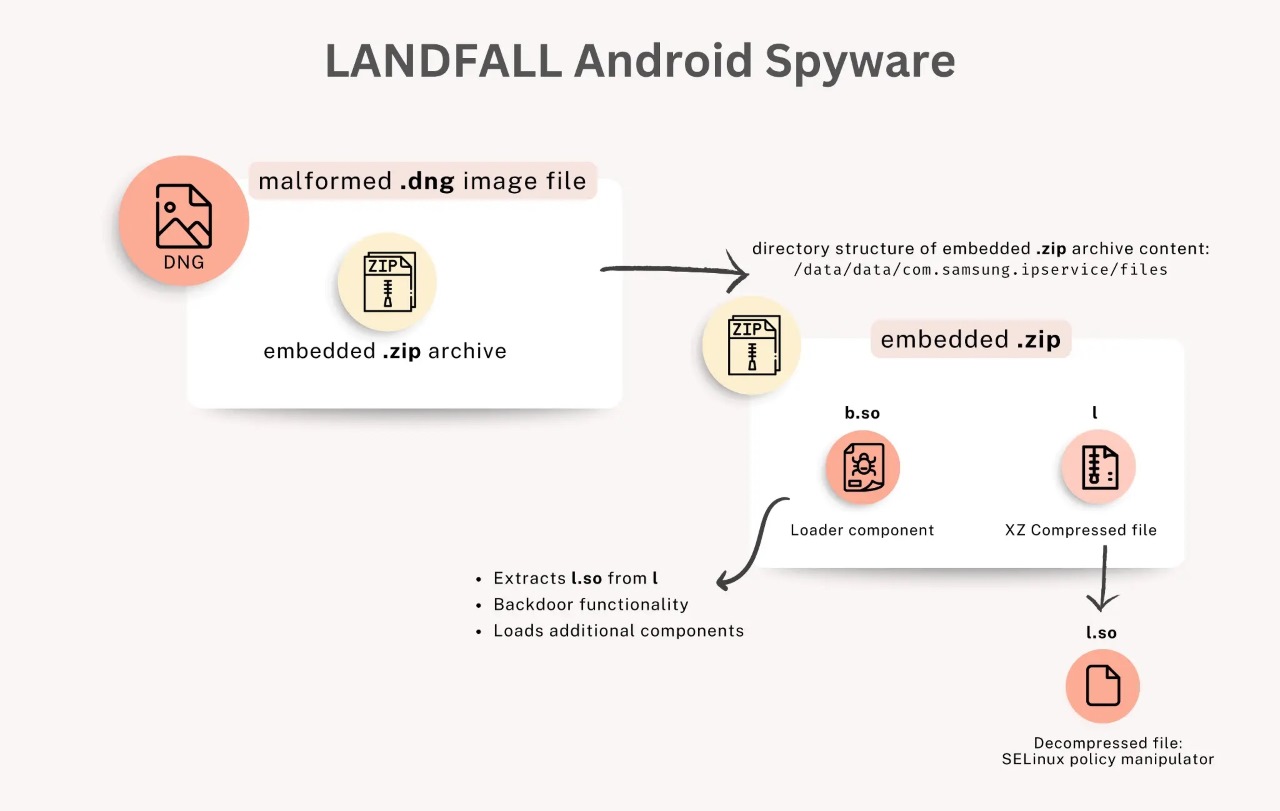
Vulnerability Description
- Vulnerability Code: CVE-2025-21042.
- CVSS Score: 8.8/10, indicating a high severity level.
- Attack Mechanism: An out-of-bounds write error (CWE-787) in Samsung’s image processing library (
libimagecodec.quram.so). - Consequences: Potential for remote exploitation and risk of RCE.
Scope of Impact
- All Samsung Galaxy devices using the
libimagecodec.quram.solibrary before the SMR Apr-2025 Release 1 - Flagship devices like Galaxy S22, S23, S24, Z Fold4, Z Flip4
- Operating system range: Android 13
Campaign Details
As mentioned earlier, this vulnerability exists due to an out-of-bounds write error. Simply put, an attacker can write to memory, leading to data being overwritten, damaging the memory structure, and potentially redirecting the control flow.
First, the attacker creates a DNG/JPEG image file with a format like: “IMG-20240723-WA0000.jpg” or “WhatsApp Image 2025-02-10 at 4.54.17 PM.jpeg”. The worrying part is that this file contains not just regular image data but also a ZIP archive appended to the end of the image file to include a malicious (.so) library.
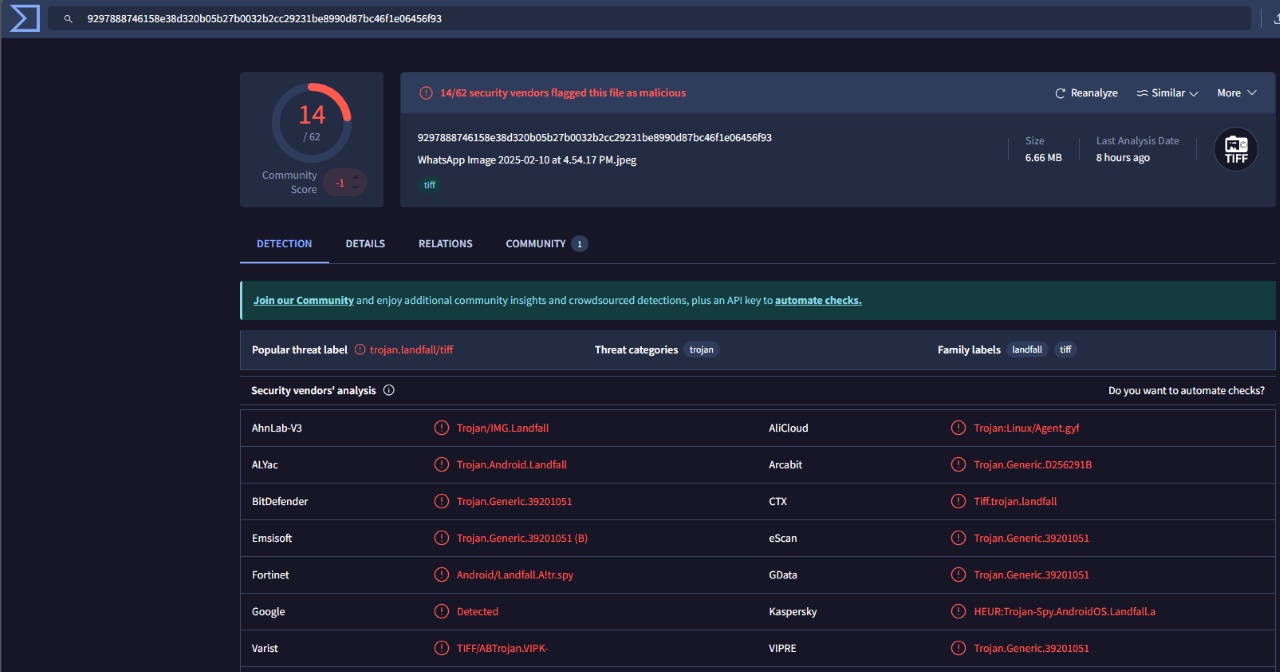
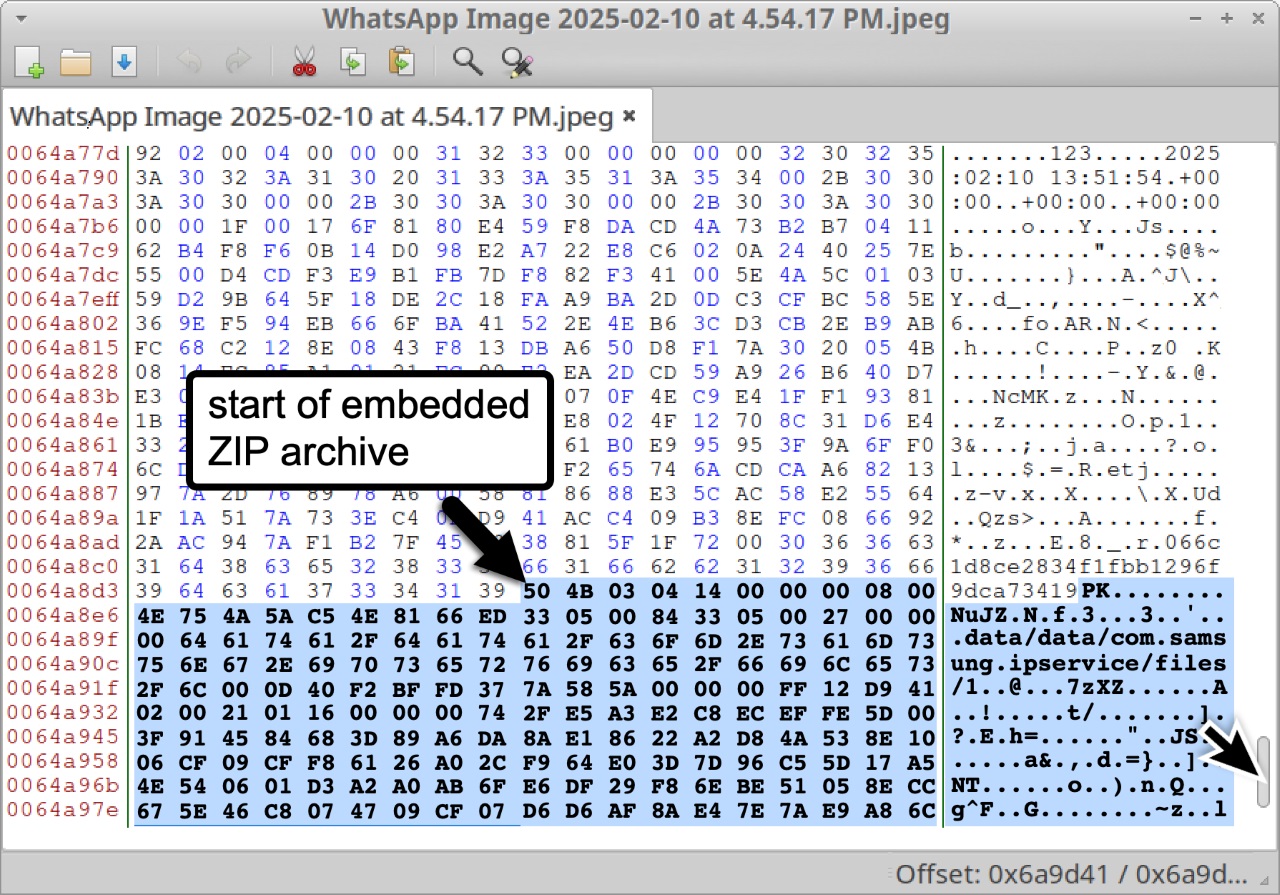
Then the attacker will distribute these image files via WhatsApp, taking advantage of the app’s automatic media processing.
When WhatsApp receives the image file and calls the native API to display, preview, and create thumbnails, libimagecodec.quram.so performs the following main steps:
- Receive and check the container/format
- Parse the header and metadata
- Process data segments/strips/tiles
- Decompress/decode pixel data
- Create thumbnails/preview/color processing
- Handle attached/non-image data (if any)
And this is the weakest point: Handling attached/non-image data. Some files can append non-image data (for example, a ZIP archive added to the end of a DNG/JPEG). If the decoder tries to parse or decompress these blocks without checking the actual size, it can lead to out-of-bounds issues.
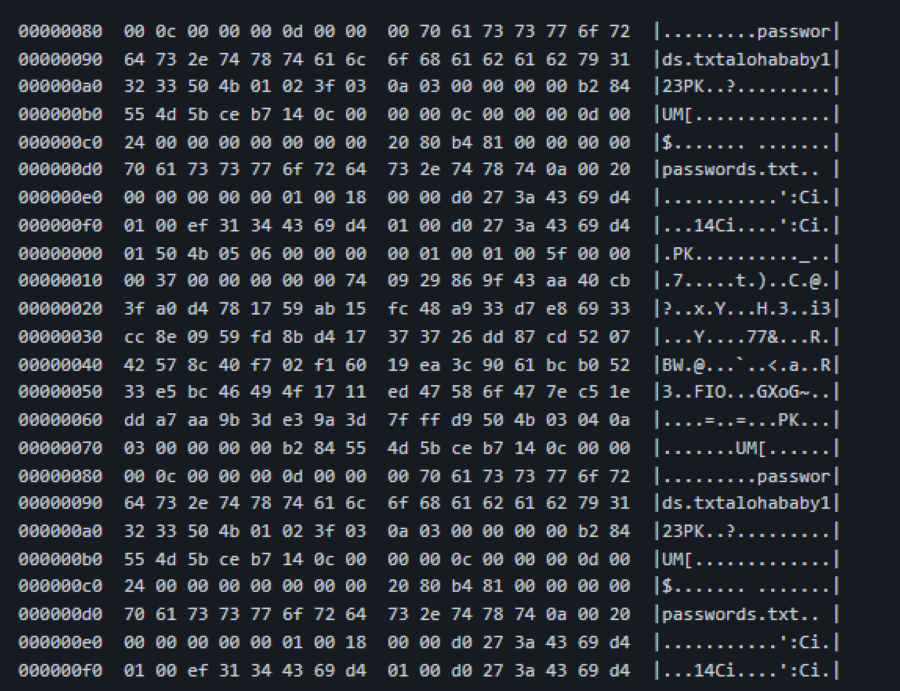
And of course, from here the attacker can easily execute RCE, which will activate malicious components to maintain and escalate privileges. LANDFALL then becomes very powerful:
- Record from the microphone, record calls.
- Track precise GPS location.
- Access photos, contacts, call history, SMS/MMS messages, files, application databases.
- Check device status (IMEI, IMSI, SIM, Bluetooth information, installed applications).
- Capable of escalating privileges, maintaining stealth, and removing traces by manipulating SELinux.
According to experts, the consequences of a successful breach in this campaign are significant:
- Users lose all privacy: devices are “eavesdropped,” “monitored,” and personal data is almost completely extracted.
- For businesses or government individuals, being monitored can lead to the leakage of important information, greatly impacting national or organizational security.
- Since this vulnerability was not previously disclosed and has been exploited since 2024, the likelihood of being compromised without knowing is very high.
Conclusion
The LANDFALL campaign clearly shows that a seemingly minor vulnerability in an image processing library can become a sophisticated espionage weapon. With just a specially crafted image sent through a messaging app, an attacker can execute remote code, access sensitive data, and maintain control over the device without the victim even knowing.
CVE‑2025‑21042 not only affects individual users but is also a serious threat to businesses, organizations, and government agencies, especially those with unpatched Samsung Galaxy devices. The wide range of impact, from Galaxy S22/S23/S24 flagships to the Z Fold/Flip series, and across Android versions 13–15, highlights the importance of timely patch management.
This campaign also underscores a concerning reality: in the digital age, even seemingly harmless media files can become sophisticated intrusion tools. Therefore, besides updating firmware, measures like disabling auto-download of media, restricting app permissions, deploying EDR/MDM, and monitoring IoC are crucial to protect users and organizations.
Recommendations
-
UPDATE IMMEDIATELY — Samsung operating system and firmware
- Update Samsung’s SMR/security patch to the latest version (the CVE-2025-21042 patch was released in SMR Apr-2025). This is the most effective measure to close the code execution vulnerability from image files.
- Security Updates Firmware Updates | Samsung Mobile Security
-
Disable auto-download and media display in WhatsApp
- Turn off automatic download of photos/videos in WhatsApp (Storage & Data → Media auto-download) and disable Media visibility to prevent the app from automatically processing or displaying files upon receipt.
-
Control permissions
- Review and restrict app permissions: microphone, camera, location, SMS, storage. Only grant “While using the app” permission or disable entirely if unnecessary.
-
Install and run security software
- Use a reliable mobile security application (Google Play Protect + Mobile AV/EDR) and perform a full scan if suspicious.
-
Raise awareness and training
- Train employees to be cautious with media files received from untrusted sources, even if they appear to be normal images.
- Guide: do not enable auto-download of media; if a file is suspicious, request it be resent as a secure link or verify the source.
- Establish device usage policies for employees with access to sensitive data: require MDM, limit BYOD, and conduct regular checks.
IOC
-
Hash file
- 9297888746158e38d320b05b27b0032b2cc29231be8990d87bc46f1e06456f93
- b06dec10e8ad0005ebb9da24204c96cb2e297bd8d418bc1c8983d066c0997756
- c0f30c2a2d6f95b57128e78dc0b7180e69315057e62809de1926b75f86516b2e
- b975b499baa3119ac5c2b3379306d4e50b9610e9bba3e56de7dfd3927a96032d
- 29882a3c426273a7302e852aa77662e168b6d44dcebfca53757e29a9cdf02483
- b45817ffb0355badcc89f2d7d48eecf00ebdf2b966ac986514f9d971f6c57d18
- ffeeb0356abb56c5084756a5ab0a39002832403bca5290bb6d794d14b642ffe2
- d2fafc7100f33a11089e98b660a85bd479eab761b137cca83b1f6d19629dd3b0
-
C2 (Command & Control)
- 45.155.250[.]158
- 46.246.28[.]75
- [91.132.92[](unit42.paloaltonetworks.com/landfall-is-new..
- [92.243.65[](unit42.paloaltonetworks.com/landfall-is-new..
- 192.36.57[.]56
- 194.76.224[.]127
- brightvideodesigns[.]com
- hotelsitereview[.]com
- healthyeatingontherun[.]com
- projectmanagerskills[.]com
Reference
| Exclusive article by FPT IS Technology Experts
Luu Tuan Anh – FPT IS Cyber Security Center |