Cybercriminals Exploit “I’m Not a Robot” Captchas for Malware
A new sophisticated malware attack exploits users through fake browser verification windows designed to resemble legitimate CAPTCHA systems.
How it Works
The attack begins when users encounter a seemingly authentic browser security check page, featuring the familiar “I’m not a Robot” interface similar to Google’s reCAPTCHA system.
However, instead of clicking on squares or selecting images as usual, this fake verification interface instructs users to perform a series of keyboard shortcuts to “complete the browser check.”
The malicious interface presents three seemingly harmless steps:
- Press Windows + R to open the Run dialog box,
- Press Ctrl + V to paste content from the clipboard,
- Press Enter to execute the command.
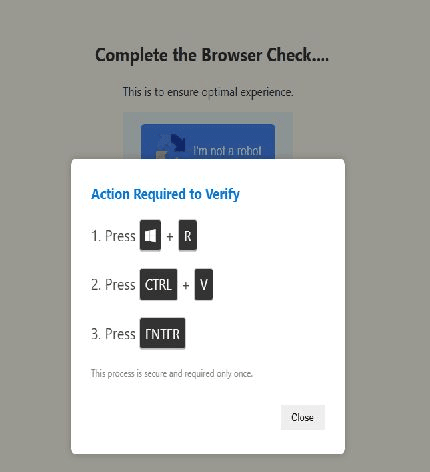
Figure 1. Process of performing malicious behavior
Attackers have meticulously designed the interface to look authentic, using visual elements and language similar to legitimate security checks.
Technical Analysis
Technical analysis reveals that the core of the attack lies in clipboard manipulation and the use of sophisticated PowerShell obfuscation techniques.
When users visit the malicious website, a JavaScript code automatically copies an obfuscated PowerShell command string into the clipboard without the user’s knowledge.
This PowerShell payload employs multiple layers of obfuscation, including base64 encoding, string concatenation, and variable substitution to evade static analysis tools and signature-based AV detection.
The obfuscated PowerShell command typically contains instructions to download and execute additional malicious payloads from a remote server. Notably, security analysts have observed many fileless attack variants—malware that operates only in memory (RAM) without writing files to the hard drive—making detection even more challenging.
Additionally, the PowerShell execution uses legitimate Windows processes and services, making the malware appear as normal system activities while maintaining persistence through registry modifications or scheduled tasks.
Recommendations
FPT Threat Intelligence recommends several measures for organizations and individuals to prevent this dangerous attack campaign:
- Configure Browser Security: Disable automatic clipboard access to prevent malicious websites from copying malware into the user’s clipboard.
- Enhance Security Awareness Training: Educate users on distinguishing between real and fake CAPTCHAs; emphasize that legitimate browser verification systems do not require executing commands via the Run dialog or Command Prompt.
- Monitor PowerShell Execution Behavior: Implement Endpoint Detection and Response (EDR) solutions to detect abnormal PowerShell command patterns, especially those related to network connections or system configuration changes.
- Strengthen Network Security: Configure security devices to identify typical attack traffic patterns such as malware downloads and Command-and-Control (C2) communications.
- Reduce Attack Surface with System Policies: Deploy application whitelisting mechanisms and strict PowerShell execution policies to prevent unauthorized script execution within the system.
References
| Exclusive article by FPT IS Technology Experts
Tran Hoang Phong – FPT IS Cyber Security Center |