Microsoft Office zero-day vulnerability actively exploited in the wild
Microsoft has recently released an emergency security patch addressing a newly discovered zero-day vulnerability in Microsoft Office, which is actively being exploited in the wild.
Details
- Vulnerability ID: CVE-2026-21509
- CVSS(3.1) Score: 7.8
- Severity: CRITICAL
- This zero-day vulnerability is currently under active exploitation by threat actors. The root cause lies in Microsoft Office’s improper reliance on untrusted input when making security-related processing decisions. An unauthorized attacker can manipulate this input data flow to bypass Microsoft Office’s COM/OLE security filtering mechanisms, thereby creating an entry point for system compromise and enabling post-exploitation activities. Successful exploitation requires user interaction. Specifically, the attacker must convince the victim to open a malicious Office document containing the exploit code. Additionally, the target must be using a version of Microsoft Office that is affected by this vulnerability.
- Affected versions: Office 2016, Office 2019, Office LTSC 2021, Office LTSC 2024, and Microsoft 365 Apps for enterprise.
Component Object Model (COM) is a platform that enables software components to communicate and interoperate. It essentially modularizes applications into components, allowing other programs to invoke and utilize their functionalities.
Object Linking and Embedding (OLE), built on top of COM, enables content from one application to be embedded and linked within another application.
Under normal conditions, Microsoft Office implements security controls to block unsafe COM and OLE components, commonly embedded in documents to execute malicious code. However, CVE-2026-21509 allows attackers to fully bypass these protections, enabling unauthorized code execution on the victim’s machine without detection or prevention.
To illustrate how these components function within the Microsoft Office ecosystem: when a user exports a report from an accounting system, the application may use COM to trigger Excel to launch and populate data automatically. Similarly, when a user embeds an Excel spreadsheet or PowerPoint slide into a Word document, OLE enables seamless interaction, allowing the embedded application (e.g., Excel) to open for editing and synchronize changes in real time.
In an exploitation scenario, attackers leverage COM as a remote execution mechanism to force the system to download and run malicious payloads. At the same time, OLE is used to disguise the payload as embedded content, such as a spreadsheet within a document. Instead of opening Excel for editing, user interaction directly executes the malicious code, effectively bypassing standard security warnings and controls.
Recommendations & mitigation
FPT Threat Intelligence strongly recommends that users and system administrators immediately update Microsoft Office to the latest version to mitigate the risk of exploitation. Additionally, users should exercise caution when handling email attachments from unknown or untrusted sources. Under no circumstances should such files be opened without verification, as they may contain malicious payloads exploiting CVE-2026-21509.
| Office version | Update status | Actions to be taken |
| Office LTSC 2021, Office LTSC 2024, and Microsoft 365 Apps for Business | A patch is available | Enable automatic updates in Microsoft Office. The software will automatically update and apply patches. |
| Office 2016 and Office 2019 | There is no patch available yet. | Risk mitigation measures should be implemented through the registry as instructed below. |
Instructions on how to mitigate the risk of exploitation for systems using Office 2016 and Office 2019:
Before beginning, users and administrators need to back up the system’s Registry:
- Step 1: Close all Microsoft Office applications.
- Step 2: Open Registry Editor. Find the Registry key that matches your Office version:
- 64-bit version (or 32-bit on Windows 32-bit): HKEY_LOCAL_MACHINE\SOFTWARE\Microsoft\Office\16.0\Common\COM Compatibility\
- 32-bit version on Windows 64-bit: HKEY_LOCAL_MACHINE\SOFTWARE\WOW6432Node\Microsoft\Office\16.0\Common\COM Compatibility\
- ClickToRun 64-bit version: HKEY_LOCAL_MACHINE\SOFTWARE\Microsoft\Office\ClickToRun\REGISTRY\MACHINE\Software\Microsoft\Office\16.0\Common\COM Compatibility\
- ClickToRun 32-bit version on Windows 64-bit: HKEY_LOCAL_MACHINE\SOFTWARE\Microsoft\Office\ClickToRun\REGISTRY\MACHINE\Software\WOW6432Node\Microsoft\Office\16.0\Common\COM Compatibility\ (Note: If you don’t see the *COM Compatibility* entry, right-click on *Common* and select New > Key to create a new one.)
- Step 3: Create a new Subkey named {EAB22AC3-30C1-11CF-A7EB-0000C05BAE0B} (right-click on COM Compatibility > New > Key).
- Step 4: In the newly created Subkey, create a new value. (right-click > New > DWORD (32-bit) Value).
- Step 5: Name the value as Compatibility Flags and set the Value data to 400 (Hexadecimal).
- Step 6: Close Registry Editor and restart the Office application.
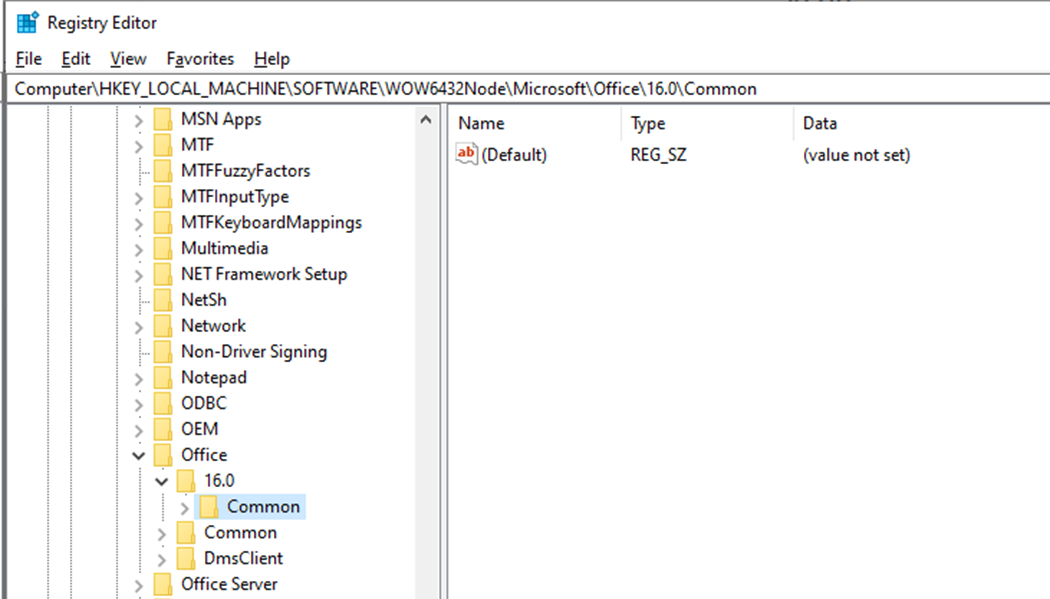
Here’s an example using the 64-bit version of Office 2016:
- The full path after setup: HKEY_LOCAL_MACHINE\SOFTWARE\Microsoft\Office\16.0\Common\COM Compatibility\{EAB22AC3-30C1-11CF-A7EB-0000C05BAE0B}
- REG_DWORD named Compatibility Flags with a value of 0x00000400
Reference
| Exclusive article by an expert from FPT IS, FPT Corporation
Nam Anh Mai Duc – FPT Information Security Center |